


Navan
4.7482.00 Reviews
App Specs
- Version
- 8.120.0
- Updated On
- License
- Free
- Downloads
- 500,000+
- Developer
- Navan, Inc
- Categories
- Travel & Local
- Platform
- Android, iOS
Screenshots

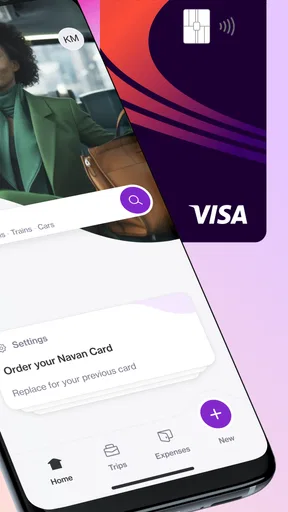
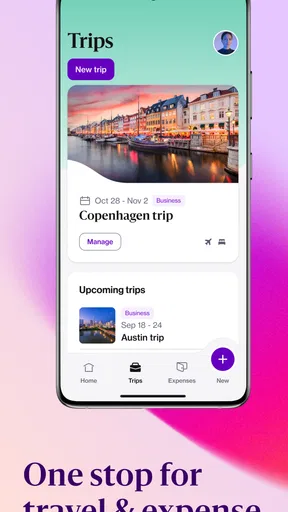
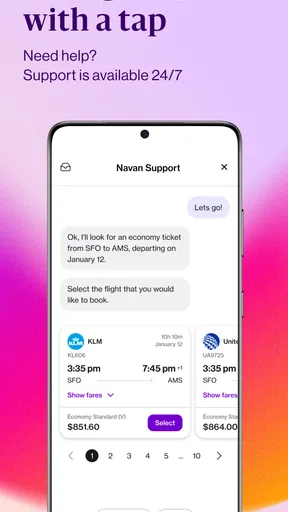
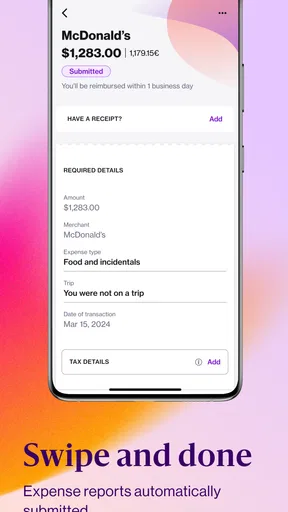
 Analysis by AppCompare
Business travel is rarely difficult because of one flight or one hotel. The trouble usually appears when several people need the same information, an expense has to be explained later, or a household member is trying to help without seeing more than they should. I tested Navan with that shared-use reality in mind, and I found an app that makes the most sense as a focused work-travel tool rather than a general family travel planner. Its purpose is to bring business trips and expenses into one place, which can be genuinely useful when a person travels often and needs a cleaner routine.
Navan, developed by Navan, Inc, is a free Travel & Local app for Everyone. It has earned a 4.7 average from around 9.3K ratings, with more than 500K installs, so it is clearly established enough to attract regular use. The current release is version 8.120.0, and it supports devices running Android 9 or later. Those details matter for a shared household device: the app is accessible to a broad age range, but its practical value depends far more on the work account and the boundaries around it than on the phone itself.
How Navan works when travel information is shared at home
A realistic example is a couple in which one person travels for work while the other helps with practical arrangements. The traveler may need to check a booking, remember an expense, or review trip details while moving between meetings. The partner at home may need to know when the traveler is returning or help organize receipts. Navan can support the traveler’s side of that routine, but it should not be treated as a shared household calendar or an open family dashboard.
That distinction is important. A business-travel app is built around the traveler’s professional activity, not around everyone in the home having equal access. I would install it on the person’s own phone or on a clearly designated work device. If a tablet is shared by several people, I would avoid leaving the account open between uses. The convenience of a remembered session is not worth confusing personal work information with another household member’s browsing or travel activity.
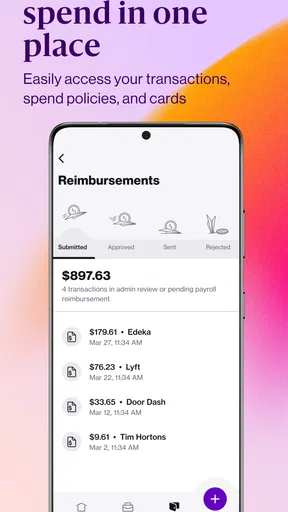
For a traveler, the attractive part is having travel and expense tasks connected instead of scattered across email, paper receipts, screenshots, and separate booking tools. In my experience, this kind of consolidation is most valuable on the return from a trip, when small details are easy to forget. A receipt captured or expense recorded while the event is still fresh can save a frustrating reconstruction later.
For the person helping at home, the benefit is more limited. Navan is not a substitute for a family messaging app, a shared grocery list, or a household itinerary board. I would use it to manage the traveler’s own work process, then share only the necessary arrival or scheduling information through an ordinary channel. That keeps business records inside the business tool and prevents the app from becoming an awkward all-purpose family organizer.
Start with the account boundary, not the booking screen
The first setup decision should be who owns the account and who is allowed to use the device. If the app is installed on a personal phone, the boundary is straightforward: the traveler signs in and handles the account. If it is installed on a shared device, I recommend agreeing in advance that the app is for one person’s work travel only. This sounds obvious, but it prevents a common household mistake: treating a professional account as if it were a shared streaming profile.
Worth Reading Before You Choose

Flipboard Shows What News Apps Must Do Beyond the Feed

Switching to Android Auto Means Rethinking Your Driving Routine

Google Calendar Makes a Crowded Week Easier to Manage

Ludo King Makes the Most of the Minutes Between Plans

Baby Panda World Brings Quick Play to Modern Phones, but Its Game Library Feels Busy

ESPN’s Live Game View Makes Following Close Games Easier
I would also separate “helping” from “signing in.” A partner can remind the traveler about a departure, help locate a receipt, or check a date that the traveler has deliberately shared. That does not automatically mean the partner should enter the account. Keeping those roles separate reduces the chance of accidental changes and makes it clearer who is responsible for business records.
Navan is free to download, which removes a direct purchase decision for the household. That does not mean every trip-related cost disappears, of course; the app is a management tool, not a promise that transport, lodging, or company expenses cost nothing. I would explain this to anyone sharing the device so the presence of a free app is not mistaken for free travel.
The age rating is Everyone, and that makes the app suitable in the broad content sense for a household device. Still, an age rating does not turn business information into children’s information. A younger family member might be able to open the app, but that does not mean they should be given access to an adult’s work account. In this case, the relevant question is trust and responsibility, not whether the interface contains mature content.
Where the app helps coordination and where it stops
The strongest coordination benefit comes from giving the traveler one place to revisit trip-related tasks. Instead of searching through multiple inboxes, the traveler can use the app as the working point for business travel and expenses. That reduces the number of places a household helper needs to ask about, even if the helper never uses the account directly.
A useful routine is to review the trip before leaving, update expenses during natural pauses, and do a final pass after returning. I would not wait until the end of a busy week. Delayed entry creates uncertainty about what a charge was for, which can be especially annoying when several meals, taxis, or small purchases look similar. The app’s value is not simply storing information; it is encouraging a more timely habit.
One non-obvious trade-off is that centralization can make the app feel indispensable while also creating a single point of confusion. If a traveler assumes every detail has been captured automatically, they may stop checking confirmations or receipts elsewhere. I would still keep the original confirmation messages and receipts until the trip and expense process is complete. Navan can organize the workflow, but good record-keeping should not depend on one screen alone.
Another practical tip is to use precise descriptions when recording expenses rather than relying on memory. “Dinner” may be enough for the traveler today but not enough when reviewing the charge later. A short note about the meeting or purpose can make the record easier to understand. This is especially helpful in a household where someone may be helping the traveler remember what happened, without needing access to every professional detail.
Coordination also works better when the traveler sets expectations before departure. I would tell family members which information will be shared, such as an approximate return time, and which will remain private, such as work-related spending or trip purpose. That small conversation prevents the app from becoming a source of unnecessary questions or accidental oversharing.
Trust matters more than the Everyone label
Because Navan carries business travel and expense information, I would treat it like a work document rather than a casual travel game. The Everyone content rating tells me the app is broadly appropriate to appear on a family device, but it says nothing about whether a child, guest, or roommate should operate the signed-in account. Those are separate decisions.
On a shared phone or tablet, I would make a habit of closing the app after use and checking which account is active before entering anything. I would also avoid handing the device to someone else while a booking or expense screen is open. These are simple habits, but they matter more than creating a complicated household process. The goal is not to make travel administration intimidating; it is to keep professional information attached to the right person.
For teenagers or younger users, I would not choose Navan as a way to teach general travel planning. Its focus is business travel and expenses, so it is better suited to the adult who actually has those responsibilities. A young person can still help with a practical task, such as reminding a parent to pack a receipt, but I would keep account access with the responsible traveler.
For a spouse or trusted partner, the decision is more nuanced. Shared finances may make some expense information relevant to the household, but professional expenses can also involve employer expectations or sensitive meeting details. I would share the outcome that the household needs rather than the entire account. In other words, “I arrive Thursday evening” is often useful; unrestricted access to every work transaction may not be.
What makes Navan different from ordinary travel alternatives
Compared with a general booking app, Navan’s identity is more clearly tied to the complete business-travel routine, including expenses. A normal travel app may be excellent for comparing leisure flights, finding a hotel, or building a personal vacation plan. It may be the better choice for a family choosing attractions, coordinating several travelers, or managing a trip where work reimbursement is irrelevant.
Compared with email alone, Navan offers a more deliberate place to return to. Email is flexible and familiar, but confirmations can be buried under newsletters, replies, and unrelated work. A dedicated business-travel workflow can reduce that search burden. The trade-off is that the app becomes another account and another routine to learn, so occasional travelers may not feel enough benefit to justify changing their habits.
Compared with a spreadsheet, Navan should be more convenient for a traveler who wants travel and expense activity connected. A spreadsheet can be customized for a household, shared widely, and adapted to unusual personal needs. It can also become messy quickly, especially when someone forgets to update it. I would choose a spreadsheet for a family budget or a complex personal itinerary, but I would look to Navan when the central problem is professional travel administration.
Compared with a shared calendar, the difference is purpose. A calendar is better for telling a household when someone is away. Navan is better suited to the traveler’s business process. I would use both if necessary: keep the family-facing schedule minimal in the calendar and keep work-travel details in Navan. Trying to force one tool to perform both jobs usually creates either too much exposure or too little useful detail.
Everyday friction you should expect
The app’s focus can also be its limitation. Someone who takes one work trip every few years may find the setup more effort than simply searching an email confirmation and keeping receipts in a folder. The more irregular the travel, the less obvious the payoff becomes. I would recommend it most confidently to people whose work already requires an organized travel-and-expense routine.
There is also a mental cost to combining travel and expense tasks. A traveler may open the app expecting to check a trip detail and instead be reminded of unfinished administrative work. That is useful when it prompts action, but irritating when the person is already rushing through an airport. My workaround is to reserve a few minutes during a calm part of the day for expense review rather than trying to complete everything while distracted.
Shared-device use introduces another source of friction: switching between convenience and privacy. Leaving the account available makes quick checks easier, while signing out or locking down the device creates an extra step. I prefer the extra step for a household device. The app is designed around an individual’s work activity, and that makes careless sharing more troublesome than it would be with a simple public transport timetable.
Travelers should also remember that an organized app does not remove the need for judgment. A charge can still be entered incorrectly, a receipt can still be unclear, and a household member can still misunderstand a schedule. Navan can support a reliable process, but it cannot replace reading the details before submitting or sharing them.
Who should use it and who should skip it
I would recommend Navan to a regular business traveler who wants travel details and expenses handled in one focused place. It is particularly suitable when trips create repeated administrative work and when remembering every receipt after returning is a recurring problem. The app’s strong average rating and broad install base suggest that many users find the approach worthwhile, although those figures should not replace judging whether the workflow matches your own travel habits.
I would also consider it for a small household in which one adult travels for work and wants a clear boundary between professional administration and family coordination. The traveler can manage the work side in Navan, while the household receives only the practical information it needs. That arrangement is cleaner than passing a work inbox around or putting every booking detail into a shared family account.
I would skip it if your main goal is planning a vacation with several relatives. A general travel planner, shared calendar, or group chat may be easier for that job. I would also skip it if you rarely travel for work and already have a simple receipt routine that causes no problems. Adding a specialized app is only worthwhile when it removes more effort than it creates.
One further exception is a household that expects every adult to edit every travel detail together. Navan may not be the natural fit for that style of planning because its center of gravity is the individual business traveler. In that situation, a shared planning tool can offer better visibility and less ambiguity about who is changing what. Navan remains useful for the traveler’s expense work, but it should not be forced to become the family’s entire coordination system.
My household verdict after using the workflow
I see Navan as a practical specialist rather than a universal travel app. Its best quality is focus: it brings business travel and expense responsibilities into a workflow that a regular traveler can revisit before, during, and after a trip. That focus is also why I would keep it on the traveler’s personal device whenever possible and resist turning it into a shared household account.
For a family, the winning approach is simple. Let the traveler own the account, share only the schedule information that others genuinely need, and use a separate calendar or messaging tool for household coordination. Keep receipts and professional records within the proper work process, and do not confuse an Everyone rating with permission for unrestricted access.
Navan is free, available for Android 9 and later, and maintained by Navan, Inc. Its 4.7 average and roughly half-million-plus installs give it reassuring visibility, but my recommendation comes from the workflow rather than the numbers. If business travel regularly creates scattered confirmations and forgotten expenses, I think it is worth trying. If your needs are mainly family vacations, shared itineraries, or occasional personal trips, a conventional travel app will probably feel more natural. For the right traveler, the real benefit is not more travel features; it is a clearer boundary between work administration and home coordination.
Pros
- Combines business travel booking and expense management in one app.
- Real-time flight updates help users react quickly to delays or cancellations.
- Stores itineraries
- receipts
- and travel details in one convenient place.
- Offers access to travel support while users are away from the office.
- Personalized policy controls can simplify compliant corporate bookings.
Cons
- Many features require a company account or employer-provided access.
- Some bookings may show fewer options than consumer travel platforms.
- Expense tools can feel excessive for users who only need travel booking.
- Support quality may vary depending on the company’s configured travel program.
- Location and trip data collection may concern privacy-conscious users.
FAQs for Navan
What is Navan, and what can I use it for?
Navan is a business travel and expense management app designed to bring work-related trips, bookings, itineraries, and spending into one place. After signing in through an eligible company account, users can search for flights, hotels, and other travel options, review company policies, manage reservations, and organize receipts or expenses. The exact features available depend on your employer’s Navan plan and account permissions.
Can I book flights and hotels directly through Navan?
Yes, Navan generally allows business travelers to search for and book flights, hotels, and other travel services from within the app. Search results may reflect your company’s travel policy, preferred suppliers, negotiated rates, and approval requirements. Before confirming a reservation, carefully check cancellation rules, baggage details, payment information, and traveler names, since changing a booking may depend on the airline, hotel, or your organization’s policy.
Do I need a company account to use Navan?
Navan is primarily intended for employees, contractors, and organizations using Navan for corporate travel and expense management. In most cases, you cannot access the full experience as a completely independent personal travel app; your employer or travel administrator must provide access and configure your account. If you received an invitation, use your work email or the company’s approved sign-in method to complete registration.
How does Navan help with expense tracking and receipts?
Depending on your organization’s setup, Navan can help you record business expenses, capture or upload receipts, categorize transactions, and submit reports for approval. Some accounts may connect with corporate cards or automatically import eligible transactions, while others require manual entry. Availability can vary by region, company policy, and integrations. Always review amounts, tax details, currencies, and categories before submitting an expense.
Is Navan safe to use for business travel and personal information?
Navan handles sensitive information such as traveler profiles, itineraries, payment details, receipts, and sometimes passport or loyalty-program data, so users should protect their account carefully. Use the official app store version, enable device security, and avoid sharing login codes. The service’s security controls and data practices may change, and company administrators can control access, so review Navan’s current privacy policy and your employer’s guidelines before using it.


